Techol - Latest Tips, Tricks, News and Productive Hacks

Includes Latest Tips, Tricks, News and Productive Hacks that you like to know.

Categories

FriendFeed

Follow Us

Subscribe In a Reader Follow Me on Twitter Follow My SMS

Enter your email address:

 Subscribe in a reader

Donation

Followers

Showing posts with label Tips n Tricks. Show all posts

In this tutorial I will show you way how to install Windows 7 from USB drive. Before follow this tutorial, make sure you have at least a 4GB USB flash drive, Windows 7 installation DVD and WinToFlash software. why do I use this software, because this software is very easy to use and simple (no instalation require). WinToFlash software will help you to install windows from flash. something else need you check in your computer is your PC support boot-up from USB drive or not. you can see this option in computer bios.

Installing windows 7 from USB drive have some advantages are you don’t need to worry if the DVD drive cannot read the disc if there is any scratches on the Windows 7 installation DVD, it is more convenient to carry around your USB flash drive rather than a DVD disc, you still able to install Windows 7 Althought the PC doesn’t even have a CD/DVD drive.

Creating Windows 7 instalation USB drive

There is a software called WinToFlash that does everything above automatically. All you need to do is run the program, set the location of the Windows 7 installation disc and the destination of your USB flash drive.

  1. Download WinToFlash software. I recommend to use the latst version.
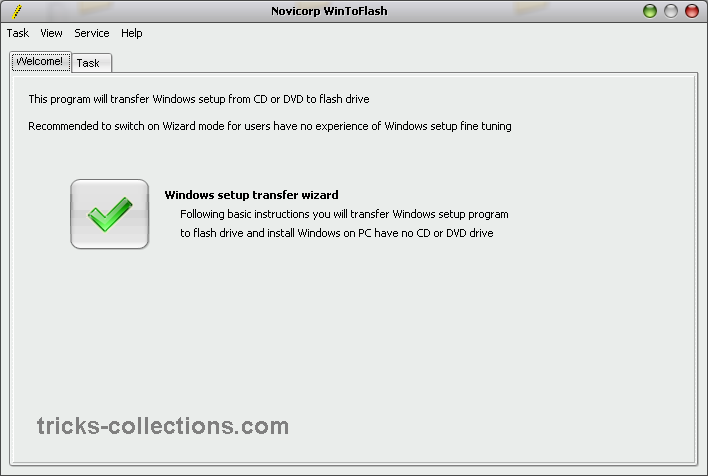
  2. Extract download file and then go to ectracted folder. run WinToFlash.exe then Click the “big check button” to start Windows setup transfer wizard.
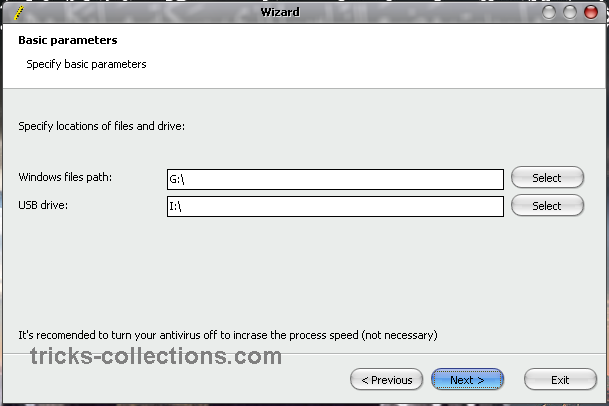
  3. Click Next then Specify the locations of Windows 7 instalation DVD and USB drive then click Next (The Windows 7 instalation DVD is the drive letter of your Windows 7 DVD drive and the USB drive is the drive letter of your USB flash drive)
  4. Select “I Accepted the terms of the license agreement” and click Continue.
  5. Click OK to start formatting your USB flash drive and the files will be automatically transferred from Windows 7 instalations DVD to USB flash drive.
  6. Click Next when finished copying.

Now How to Install Windows 7 from USB drive

Boot up the computer from USB flash drive. You will need to go into BIOS setup and set to boot from flash devices (USB device). If you got it right, the Windows 7 installation should load from your USB flash drive and install the Windows 7 like installing windows 7 from DVD drive.

Related Posts with Thumbnails

Internet Cell Boost Lite is free tool to optimize internet connection. Internet Cell Boost work to 31 different connections including DSL, cable modem, GPRS, UMTS, HDSPA, WIMax, ISDN, wireless network, etc.

Featured Internet Cell Boost Lite

  • Optimize your Internet Connection speed by applying several tweaks that help you get the most out of your subscription package.
  • Works almost all internet connections type .
  • Completely free to use with no hidden fees, plus the option to upgrade to Highspeed Surfer for more features.
  • Extremely easy to use. Just select your Internet connection type and it automatically does the rest.

How to use Internet Cell Boost lite

To optimize internet connections using this software is very easy and take a times not more than 5 minutes to optimize your internet connections. Here how:

  • Install this software, once instalation finish run this software.
  • Select your internet connections type then click “Apply My Custom Optimizations” button.

Download Internet Cell Boost follow this link: reohix.com

Source

Related Posts with Thumbnails

Mostly, we use internet to download the latest file and content. If we want to download from Rapidshare, we have to have premium account to download the files without limitation. But to get premium account you must buy the account for some dollar.

Now On this article, I will show you how to download rapidshare files without limitation but without premium account. On internet there are some online tools to download rapishare file easily and we needn’t await several second before download link appear. My favorit tool is RapidIt.

Here How to Download Rapishare files withi RapidIt

  • Open Rapidit website then scroll down to the bottom of website. Copy rapidshare file’s link to the form then click download button. The website will continue with loading process. This process will finish within seconds.

  • Once process finished, download the files by clicking “Begin your download” button.

Related Posts with Thumbnails

Do you want get more earning from Adsense? Install EarnItUp in your wordpress blog. EarnItUp is a free unique wordpress plugin that will increase Google Adsense earnings between 20% and 40% but in my cases only 10%. I don’t know how to EarnItUp work but you can rest assured that EarnItUp makes no modifications to your website or Adsense ads as this is strictly forbidden by Adsense TOS.

How to Install EarnItUp in your Wordpress Blog? It easy, there are only 3 steps on getting more Adsense money.

  1. Download the EarnItUp Plugin. You can download the plugin from the link below
  2. Upload EarnItUp.php to your wp-content/plugins folder and activate the plugin
  3. Setting the plugin by Go to Settings-> EarnItUp Registration and register the plugin. Because EarnItUp it is a free product but requires registration in order to be used. Once registered, you will start earning 30% more Adsense earning.

Now EarnItUp available only for Wordpress platform. For other wordpress and only word on adsense. For other blog platform may be available on the next version of EarnItUp. Get more info and download EarnItUp open the EarnItUp website here: http://earnitup.com/.

Related Posts with Thumbnails

Google now is most popular Search Engine on internet. Millions of people every day use Google to search for information on the Internet. To obtain search results more accurate on Google we can use Google hacking. Using Google hacking is actually very easy, but usually we often forget the syntax is often used. Now with GoogleHack software we can easily do Google hacking.

Google Hacks will make easier to search music files, eBook, video, etc. Google Hacks is a compilation of carefully crafted Google searches that expose novel functionality from Google’s search and map services.

How to use Google Hack

  • Very easy to use, after installed this program can be run directly without restarting the computer.
  • In the search box type your keyword.
  • On the type select your searching type then click search button to start searching on google.

Do you know what it means Hack? Hacks is meant as this definition. “A Hack is a modification of a program or device to give the user access to features otherwise were unavailable to them.” Taken from Wikipedia.

To get more info about GoogleHack and get latest version of Google Hack open this URL: http://code.google.com/p/googlehacks/

Related Posts with Thumbnails

Can't find what You're looking for? Try Google Search.

Translation by Google

Popular Posts

Recent Posts

Earn Money By Blog Reviews

PayPerPost
ss_blog_claim=912fac891e81c0039da80c7868c8006f ss_blog_claim=912fac891e81c0039da80c7868c8006f