Techol - Latest Tips, Tricks, News and Productive Hacks

Includes Latest Tips, Tricks, News and Productive Hacks that you like to know.

Categories

FriendFeed

Follow Us

Subscribe In a Reader Follow Me on Twitter Follow My SMS

Enter your email address:

 Subscribe in a reader

Donation

Followers

Showing posts with label Web. Show all posts

Mostly, we use internet to download the latest file and content. If we want to download from Rapidshare, we have to have premium account to download the files without limitation. But to get premium account you must buy the account for some dollar.

Now On this article, I will show you how to download rapidshare files without limitation but without premium account. On internet there are some online tools to download rapishare file easily and we needn’t await several second before download link appear. My favorit tool is RapidIt.

Here How to Download Rapishare files withi RapidIt

  • Open Rapidit website then scroll down to the bottom of website. Copy rapidshare file’s link to the form then click download button. The website will continue with loading process. This process will finish within seconds.

  • Once process finished, download the files by clicking “Begin your download” button.

Related Posts with Thumbnails

Google now is most popular Search Engine on internet. Millions of people every day use Google to search for information on the Internet. To obtain search results more accurate on Google we can use Google hacking. Using Google hacking is actually very easy, but usually we often forget the syntax is often used. Now with GoogleHack software we can easily do Google hacking.

Google Hacks will make easier to search music files, eBook, video, etc. Google Hacks is a compilation of carefully crafted Google searches that expose novel functionality from Google’s search and map services.

How to use Google Hack

  • Very easy to use, after installed this program can be run directly without restarting the computer.
  • In the search box type your keyword.
  • On the type select your searching type then click search button to start searching on google.

Do you know what it means Hack? Hacks is meant as this definition. “A Hack is a modification of a program or device to give the user access to features otherwise were unavailable to them.” Taken from Wikipedia.

To get more info about GoogleHack and get latest version of Google Hack open this URL: http://code.google.com/p/googlehacks/

Related Posts with Thumbnails

Maybe you are interested in making money with your blog using Google Adsense. Read the following tips on how to successfully register Google Adsense account. At this time to create Google Adsense account you must have a website or Blog with dot com domain. If you already have a dot com domain its does not guarantee you can success creating Google Adsense account.

After collecting a lot of information from friends and various sources now I will give you tips how to success create a Google Adsense account.

The first tip, the primary content of your website or Blog must be supported by Google Adsense; if not you don’t create Adsense account because it is very important.

The second tip, don’t create Google Adsense account if your blog or website have little content. Update your website or blog to have at least 10 contents, if more is better.

The third tip, you must change ownership of your domain name by your name because frequently asked questions by Google Adsense when creating Google Adsense account is: “whether is your submitted website is your website? Or similar question” If you buy the domain through your hosting owner and you have access to configure your domain you can change the domain owner by yourself but if you do not have enough knowledge about this, please ask your friend or your hosting administrator.

The fourth tip, add “Meta author” on your blog. This is usually very rarely used the most frequently used is Meta keywords and Meta description.

With the above tips, possible your application request will be accepted by Google. If rejected you can apply again after some time.

Source

Related Posts with Thumbnails

I was checking the moderated comments and also the comments that went into spam just now and there was a comment from Diabolo asking me if I know anything about ShareLinkDevil. No I haven’t heard of it but I decided to check it out since I had time today. I am glad I did because it is a very useful website that offers free service to check for active/dead the links for more than 400 one-click file hoster and also able to extract the real links for more than 300 redirectors or link-protector websites.

The link checker acts like RapidShare Checker where it will check for the availability of the files except that it works on 400 sites. This is useful if you want to download a Blu-Ray rip movie with 80 links and you better check them all before you start downloading. As for redirectors and link-protector websites such as LinkBucks, UserCash, URLCash, Linx.in and etc, ShareLinkDevil can also decrypt and extract the original links. LinkBucks and URLCash are a way of making money but it can get very annoying. I’ve seen people redirecting from LinkBucks to URLCash and then only to the original rapidshare link.

With ShareLinkDevil, simply paste any links and it’ll automatically decrypt the links and then checks it to see if the file is available or not.

Let’s give this UploadJockey link a test. When I access this link from my browser, I see a full page of advertisement and Firefox shows that a popup has been automatically blocked. I had to click Skip this ad to continue and immediately 2 pop under advertisement windows opens up. Then I have to scroll right to the bottom to get the 7 available download links which is also encrypted. Now I click on Other link, it brings me to linkbucks page with a 15 seconds countdown. I had to look at the page for 15 seconds or the countdown stops. After 15 seconds, again I see the top bar with full of ads and end up with the message “The file could not be found. Please check the download link.”

But if I paste the UploadJockey link to ShareLinkDevil, within seconds it found 7 mirrors and then checks all 7 links which shows 5 links are active and 2 not found. I didn’t need to go through all the annoying steps above to find that the link is dead.

SLD is on a free shared server (110mb.com) so it could get a little slow in processing your links during peak hour. If you find any links that are not supported by SLD, just write a comment in the guestbook and I am sure Diabolo will make it work. As for jDownloader user, you do not have to worry about these link protectors or redirectors websites because it has built-in support for link checking and decryption.

[ Visit ShareLinkDevil ]

Related Posts with Thumbnails

If we want to know whether a file contains virus or not is by downloading the file to our computer first and then let the antivirus that is installed on our computer do the job. Or another method is to also download the suspicious file to our computer and then upload it to Virustotal or independant antivirus website for scanning. I get a little upset yesterday when I wanted to send a link that contains photos taken during my wedding to a friend in an archive (.zip) file. The first thing that she asked was is that a virus? Are you sending something awful to me? Even after I said that it’s my wedding photo, she still didn’t dare to download because her computer friend told her not to simply download stuff from the Internet…

I don’t know what kind of computer friend she had but am sure he/she is a newbie that is just too afraid too download anything over the Internet even from a trusted friend. If one antivirus doesn’t give her any confidence, then maybe over 40 antivirus in VirusTotal scanning that one file should do it. However that requires her to download the file to her computer first. To solve this problem, here’s a way to scan files with 22 antivirus engines without first downloading it to your computer.

NoVirusThanks, a website that offers free service to analyze your file with 22 AntiVirus Engines and will report back the analysis result has now included a new feature to scan web address. Last year I’ve written about NoVirusThanks but back then it didn’t have such feature.

The new “Scan Web Address” option allow users to scan a file before they download it in their own computer. You can scan, for example, the file located in www.site.com/file.exe before download it in your computer. It can also be used to scan a single web page .html/.php/.js with all the Antivirus engines. Sometimes when a direct download link to a file is being hidden, Scan Web Address can also handle the redirection or any changes in the filename. Other than that, the online scanning feature by NoVirusThanks has been recently optimized for stability and with improved binder detector.

Let me walk you through it on how to scan a file without downloading it to your computer using NoVirusThanks.

1. Find the link that you want to scan. Let’s take DPC Latency Checker for an example. Visit the official DPC Latency Checker download page.

2. Right click on the link that lets you download the file and select Copy Link Location.

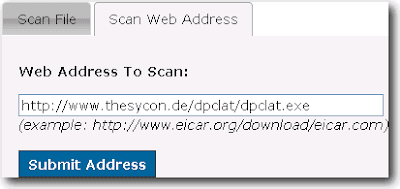
3. Now go to NoVirusThanks and click Scan Web Address tab.

4. Right click on the box just below the text that says “Web Address to Scan”, select Paste and finally click the Submit Address button.

5. Wait for about a minute and you will have your report on how many antivirus detected the file as infected.

The advantage of this feature allows you to save your time and bandwidth if you are on a limited plan from your ISP. Other than that, people with fear from downloading files over the Internet can now feel safer to download. I believe the maximum file size limit to scan is 20MB. I tried scanning Kaspersky Anti-Virus 2010 v9.0.0.463 installer file (kav9.0.0.463en.exe) but got the error “Could not fetch the requested address: Failed writing body”.

Related Posts with Thumbnails

Can't find what You're looking for? Try Google Search.

Translation by Google

Popular Posts

Recent Posts

Earn Money By Blog Reviews

PayPerPost
ss_blog_claim=912fac891e81c0039da80c7868c8006f ss_blog_claim=912fac891e81c0039da80c7868c8006f